skip to main |
skip to sidebar
Challenge Problems: 1. Create, test and debug a Ruby program called dognames.rb or catnames.rb to accept 3 names from the keyboard and to display each name on the screen in alphabetical order WITHOUT using a data structure such as a list.
a.) Create a ruby file named dognames with the following code: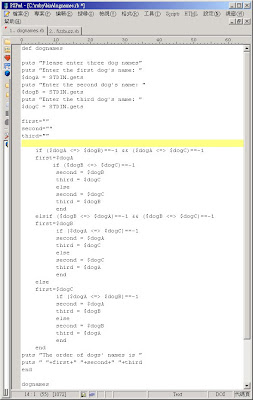 Code Explanation:
First, create a method name dogname.Second, print out a message to ask user for imput three dog names and store the standard input to the variable named dogA, dogB and dogC.Third, create three varibale which declare null is used to store the order of dog name, they are named first, second and third.Fourth, use if-elseif-else statement to sort dog name order, if the result is -1, that means the front variable is smaller, for exampe, (a <=> b)==-1.Fifth, print out the order of the dog name and end the dogname method. Sixth, execute dogname method.
b.) Execute the dognames.rb by issuing the command "ruby dognames.rb", and the result is showed as below screen dump. 2. Write a Ruby program called fizzbuzz.rb that prints the numbers from 1 to 100. But for multiples of three print "Fizz" instead of the number and for the multiples of five print "Buzz". For numbers which are multiples of both three and five print "FizzBuzz". a.) Create a ruby file named fizzbuzz with the following code:
 Code Explanation:First, declare a variable named num and set the value to 1, Second, use while-loop to control the looping between 1 to 100Third, use if-elseif-else statement to set the conditon, if multiples of three print "Fizz" instead of the number, multiples of five print "Buzz" and multiples of both three and five print "FizzBuzz". Fourth, num will plus 1 per each looping.b.) Execute the fizzbuzz .rb by issuing the command "ruby fizzbuzz .rb", and the result is showed as below screen dump.

3.Compare the Ruby and Python versions of the dog years calculator:
#!/usr/bin/ruby
# The Dog year calculator program called dogyears.rb
def dogyears
# get the original age
puts “Enter your age (in human years): "
age = gets # gets is a method for input from keyboard
puts # is a method or operator for screen output
#do some range checking, then print result
if age <> 110
puts "Frankly, I don't believe you."
else
puts "That's", age*7, "in dog years."
end
dogyears
Python
#!/usr/bin/python
# The Dog year calculator program called dogyears.py
def dogyears():
# get the original age
age = input("Enter your age (in human years): ")
print # print a blank line
# do some range checking, then print result
if age <> 110:
print "Frankly, I don't believe you."
else:
print "That's", age*7, "in dog years."
### pause for Return key (so window doesn't disappear)
raw_input('press Return>')
def main():
dogyears()
main()
===========================================
There are some different codes syntax between Ruby and Pythob which are listed in the following
1.Getting standard Input Ruby uses get, but Python uses input
2. Printing out the messageRuby uses puts, but Python uses print
3.The syntax of if-statement is differenta.)Ruby does not need the symbol -> “:” after the if-conditonal, but Python needsb.) Ruby uses “elsif” in if-elseif-else statement, but Python uses elif.
4.)Ruby does not need call the method in the main(), but Python needs.
In the dogyear program, actually, both of them do the same thing that get the input from console and verify the input integer whether is smaller than zero, if yes , print out “Negative age?!? I don't think so” if no, verify it whether is smaller than 3 and older than 110, if yes, print out “Frankly, I don't believe you.”, and finally, if all condition is not true, it let the input integer times 7 and print out "That's", then print out the value of input integer which has been already timed 7 and finally print out "in dog years."
TO-DO
1. Spend some time moving your way through the 46 Ruby coding examples in the Ruby Tutorial with Code from http://www.fincher.org/tips/Languages/Ruby/
Partially Done!
2. What are the syntax differences in the way that Ruby and Javascript use the if statement?
The syntax of Ruby's If statement which refers to tutorialspoint(2009) at http://www.tutorialspoint.com/ruby/ruby_if_else.htm, that is..
=================
if conditional [then]code...[elsif conditional [then] code...]...[else code...]end
=================
"If" expressions are used for conditional execution. The values false and nil are false, and everything else are true. Notice Ruby uses elsif, not else if nor elif.
Executes code if the conditional is true. If the conditional is not true, code specified in the else clause is executed.
An if expression's conditional is separated from code by the reserved word then, a newline, or a semicolon.
For example:
#!/usr/bin/ruby
samAge=20
joeAge=20
if samAge > joeAge
puts "Sam is older than Joe"
elsif samAge < joeAge
puts "Sam is younger than Joe"
else
puts "Sam and Joe are in same age"
end
The syntax of Javascript's If statement which refers to tutorialspoint(2009) at
http://www.tutorialspoint.com/javascript/javascript_ifelse.htm, that is
=============================================
if (expression 1){
Statement(s) to be executed if expression 1 is true
}else if (expression 2){
Statement(s) to be executed if expression 2 is true
}else{ Statement(s) to be executed if no expression is true}
==============================================
It is just a series of if statements, where each if is part of the else clause of the previous statement. Statement(s) are executed based on the true condition, if non of the condition is true then else block is executed.
For example:
From the above "if" statement examples for Ruby and JavaScript, there are some different between them.
Ø An if expression's conditional, Rudy is separated from code by the reserved word then, a newline, or a semicolon, but Javascript needs to use bracket( ) for condition(s) and and use a symbol { } for action(s)
Ø Ruby does not need to declare the data type of variable, but Javascipt needs it.
Ø Ruby uses “elsif”, but Javascript uses “else if”, for handling the other condition between if -else statement.
Ø Ruby uses "puts" and the string needs inside double quote, but Javascript uses document.write(" string here ") for printing out the message.
Ø Ruby need not use semicolon at the end of each statement, but Javascript must require.
3. While Ruby and Python are quite similar, can you find some similarities between Ruby and Javascript?
Darell(2009)(http://tore.darell.no/pages/javascript_eye_for_the_ruby_guy) stated there are some similarities between Ruby and Javascript which are listed in the following:
Ø Both languages are highly dynamic, allowing you to change objects and methods at runtime.
Ø Both languages are very object-oriented, but with different approaches. Ruby is a class-based, object-oriented language with functional aspects while JavaScript is a functional, object-oriented language with some class-like functionality.
Ø Variables in JavaScript, like Ruby, hold data. In the case of basic types, they hold the value of the type itself, but in the case of objects it holds a reference to the object itself.
Ø JavaScript, like Ruby, is heavily object-oriented, and objects are used everywhere.
Ø Functions in JavaScript, like blocks in Ruby, provide closure. That is, the variables available in the scope where the function is defined are always available in the function, even if it’s called from another scope.JavaScript is prototype-based, but it has the concept of classes. Kind of. There is a new keyword which is very familiar to those having used class-based languages. In Ruby this is not a keyword, but a class method, but the concept is the same: It instantiates a new object from that class.


